
Tag Archives: reviews

An iPad Mini Review

ipad-mini-repair-ifixyouri

The iPad Mini has recently been released. As the holidays approach, it is important to write a review to help people decide whether or not it is worth the investment.

A Look At the New iPad Mini

With the introduction of any new device it is always best to weigh the advantages against the disadvantages in order to make a more informed decision.

Although such an assessment doesn’t safeguard the consumer from unforeseen accidents such as a cracked screen or other problems that may require iPad repair. It’s still important to keep these considerations in mind. Here are some pros and cons of the Mini:

Pros

  • Long Battery Life
  • Lightweight
  • 4:3 screen ratio

Cons

  • Expensive Price
  • No headphones included
  • Lower screen resolution than competition

This device did not win any awards during its unexpected launch, but it has surpassed many users expectations. Despite its high price tag, the iPad mini is a useful and purposeful unit.

The iPad Mini’s Build

To compete with products that are selling well for the competition, Apple had no alternative than to introduce a smaller version of the larger iPad. Its high quality craftsmanship is what sets it apart from the competition. It is light enough to hold, yet not flimsy enough to damage.

The iPad Mini’s Screen

The iPad Mini’s screen may not be small enough for some, but manages to stay as clear and beautiful as its larger version. Despite the lack of a retina screen, it is much better than most smaller tablets on the market like the Kindle or Nook. Web browsing is very simple and utilizing social media is a snap on the iPad Mini.

The iPad Mini’s Camera

Still shots from an iPad Mini are not impressive, however the video is much better. There are many features that make it good for photo editing and uploading to different media sites. In the end, as a camera, it falls short.

The iPad Mini’s Battery

This device has one of the best batteries that Apple has ever produced. It is one of the few small tablets that can compete with the life of the Nexus 7. USB charging will take approximately 4 hours.

Whether or not a person decides to buy an iPad Mini will depend on personal thoughts and preferences.  There are many small tablets on the market. Despite the high cost, the iPad Mini seems to be worth the investment.
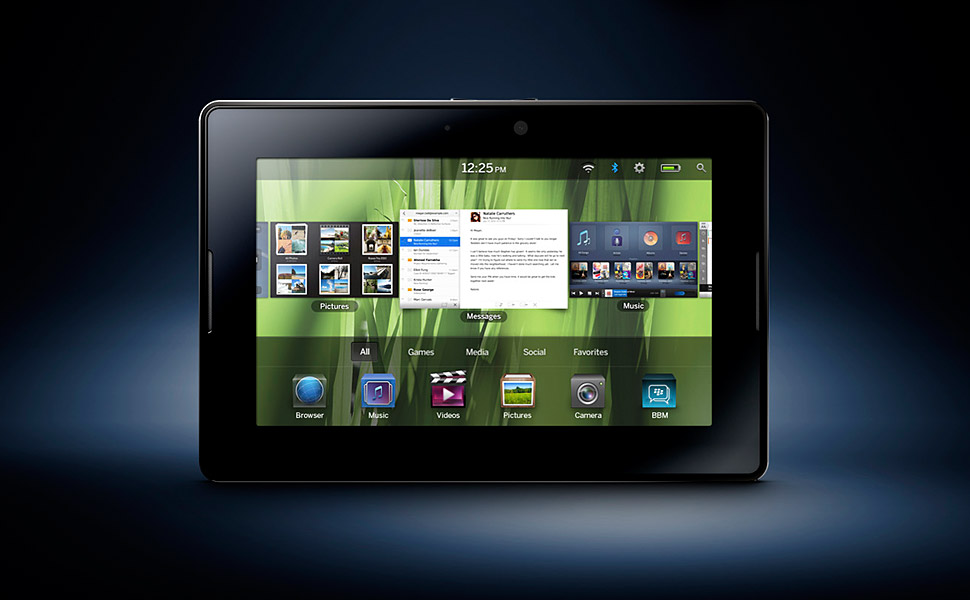
The RIM Tablet: A BlackBerry PlayBook Review

blackberry-playbook-ifixyouri
The Blackberry PlayBook has finally come of age. After gaining average reviews and failing to attract iPad-like customer excitement during its launch, a huge price drop and a profoundly revised OS seems to have worked. The PlayBook has a graceful and beautiful interface that is so simple to use that it actually rivals those of Android’s Asus Eee Pad Transformer Prime and Apple’s iPad2 in this front.

The current price of BlackBerry PlayBook is $199 for 16GB, $249 for 32GB and $299 for 64GB. This is relatively lower compared to the 8GB Amazon Kindle Fire that goes for $199. Arguably, the Kindle Fire is a better media machine with its online-based ecosystem of music, books and movies. Apple’s third generation iPad gives the PlayBook a run for its money with its glut of compelling apps. The PlayBook on the other hand has a dearth of the same.

User Interface, Hardware and Design

The BlackBerry gadget measures 5.1×7.6×0.4 inches and weighs 14.4 ounces. Its front panel consists of black glass while the back panel is soft and tapered. The Playbook’s 1,024-by-600-pixel display is more vibrant and brighter when compared to the Kindle Display.

Hardware

The device lacks a home button. However, it more than makes it up for this by allowing users to employ an easy sweeping motion from the bezel to the display center. At the top edge of the PlayBook, there is a standard 3.5mm headphone jack, volume rocker and power button. It is also equipped with an accelerometer and a 6-axis internal gyroscope.

The device has a built-in internet-tethering feature that enables users to use the gadget’s signal as its hotspot via Bluetooth. Users do not pay extra charges for this feature. As a result, the Wi-Fi only PlayBook is an excellent deal for users.

Ports

The bottom edge has a micro USB connector, HDMI output and a port for magnetic charging similar to the one found on the Apple MacBook Pro. It is compatible with the optional RIM’s dock accessory although it only comes with a micro USB cable and charger as standards.

Graphical Interface

The graphics of the BlackBerry PlayBook are colorful and sharp. So is its overall layout. Despite having fewer apps when compared to its competitors, the existing apps are easy to launch and you get to see background activities without much hustle. At the bottom of the interface, a dock holds five icons, which displays more icons when expanded upwards.

Tech Specs

The device has more than enough hardware power to power its apps. The gadget boasts of a dual-core TI OMAP4430 CPU, PowerVR SGX540 for graphics and 1GHz ARM Cortex-A9 chip that comes with a dual-channel memory controller.

Browser & Apps

Finally, the BlackBerry PlayBook lays claim to a magnificent web browser capable of fast performance, intuitive interface and a full support for Flash 10.1. Its PlayBook OS 2.0 comes with the all-important native email, calendar support and contacts.

Conclusion

The BlackBerry PlayBook is a practical tablet computer and reasonably priced compared to other similar gadgets. However, I’ve heard reports that many PlayBooks are malfunctioning. This isn’t a problem considering they can be fixed by BlackBerry PlayBook repair experts iFixYouri, but the manufacturer still has some work to do before the gadget can claim the bragging rights in the tablet computer space.