
Tag Archives: OS

Using Siri on iOS

siri-iphone-repair-ifixyouri

Not long ago, Google enhanced their iOS search app by including a voice-enhanced feature. This has caused many users to compare the search results of Siri with Google results, which in the end, has caused users to misunderstand the capabilities of Siri.

Understanding Siri

Apple refers to Siri as a “virtual assistant” with good reason. With it, users can be reminded about upcoming events, appointments  or book tables. This along with searching for reviews of movies and current sports scores makes it an invaluable program.

Note: As amazing as Siri is, such a feature can be rendered useless in the event of an unforeseen accident that may require iPhone repair. Therefore it is always best to have a professional repair service, such as iFixYouri, at your disposal for these unpredictable instances.

Users love Siri on iOS and rely on it as their own personal digital assistant. Not only is it capable of handling simple searches, but it can also be used as an alarm as well as a reminder to buy milk. While Google offers much of the same on Android, these capabilities are unavailable in the iOS search app and were not thought of during the original launch of the app.

Digital Assistance

Digital assistance features allow the user to interact with their computer without the use of a traditional mouse and keyboard. These features intertwine in a way that allows the OS to start the functionality upon request. The assistant changes the request of the user into a system action, but does it in a way that is not only dictation or searching the web.

Dictation, as well as reminders, showed up on the desktop with the use of OS X Mountain Lion. Notes were created in iCloud and various other iOS-motivated features. Although all of the components were present, the voice and action connection were not present, which is why Siri did not arrive at this point.

Connecting OS Features

There is a lot of engineering that goes into connecting the features of an OS with a virtual assistant. It is possible that Apple did not see this as a priority at the time that Mountain Lion was being created, or perhaps, testing was incomplete.

Siri is quick and efficient and users like that it takes less effort to complete tasks. This is the main reason users would like to see it become part of OS X. There should be few enough technological issues that nothing should stand in the way of that happening.

Windows 8 Preview: Microsoft’s Next Move

windows-8-ifixyouri
Just when loyal Windows users were getting used to Windows 7, the iconic software company has announced and offered a Windows 8 Preview. Just what is the next move for Microsoft? Here are some of its highlights and why it is a breeze to use. Although the official launch will be in October this year, a few minor adjustments will be made from the trial version until then.

Easy Download

The Windows 8 Preview team has made it easier for current users of its predecessors XP, Vista and 7 to download Windows 8 Preview as an upgrade for $39.99. An additional bonus is the Windows Media Center for free, after the download is successful. A step-by-step guide will then be made available from purchase to download and installation.

Compatibility Uses

A Windows 8 Upgrade Assistant informs users if the device is ready for the new version. Users will then be able to choose necessary files and data to “carry over” to Windows 8. When downloading Windows 8 for more than one device, be sure to connect them to a computer and it will sync in. Windows 8 also utilizes Skydrive, Microsoft’s version of free cloud storage, where critical files are synced immediately for progressive, hassle-free file exchange.

Metro Instead of Start

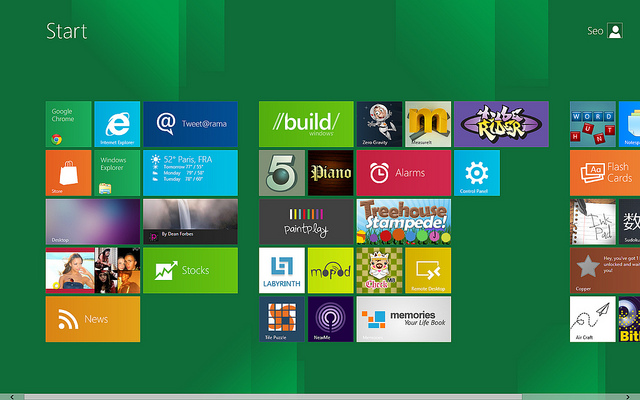
Windows 8 Preview has shown that it finally bid goodbye to the Start button, one identifying feature of the Microsoft Windows user experience since its earliest versions. Where the Start button should be, it opens up into the Metro Interface leading to a selection of Tile Apps. However, some hesitation has been expressed that the Metro Interface is not ideal for desktops and laptops but is instead more geared to make tablets and smartphones more interactive. This has posed quite an issue for file retrieval among laptop and desktop users.

Thumbnails for Navigation

More test users say Windows 8 Preview is designed to be used with a touchscreen, hence the thumbnails for navigation which, when tapped, will open to many different Apps and can be used and monitored side by side to highlight its appeal as a committed UI. Perhaps Microsoft is pushing its touchscreen netbooks in the market with an already able Operating System? For this version, the thumbnail navigation is Windows Live.

windows-8-ifixyouri

Faster Interaction

Obviously, Windows 8 is centered on full-screen interaction for top social media Apps and so far, reviews say that the OS is remarkably fluid. When connected to the web, the tiles offer a live update which eases having to open windows on an older version of the OS. To add, its boot time is also faster for both shutdown and starting up. Faster updates are also easier now that auto-complete on social media apps is present when typing is done.

The Verdict

The Windows 8 Preview shows that this newest breakthrough has much to offer; it is clean, smart and simple. In its biggest year ever, Windows has given new meaning to devices through its new method of computing. It is a powerful tool and has so many possibilities. With the new changes made, the choice is still up to the consumers.

If you’re curious about using Windows 8, but you don’t have a working device that is compatible, now is the time to get your Windows-compatible device fixed.