A Broken Cell Phone Means a Disrupted Life

cell-phone-smartphoneText messaging, mobile internet and electronic mail on the go — it is difficult, and even impossible for some people, to imagine life without these technological advances. For some individuals, being without their mobile phones and smartphones makes them feel uneasy and uncomfortable. Mobile technology has not just influenced society, it’s defined it. And a broken cell phone can mean an interrupted life.


Attitude towards Mobile Use

An outstanding 84% of users worldwide said that they could not go a single day without having their mobile devices on hand.  So when the mobile device breaks, it needs to be fixed ASAP, or life gets seriously disrupted.  At iFixYouri, we know how important the devices can be in your life, and getting your smartphone repaired quickly and properly is the #1 goal.

Mobile Phone Use and Relationships

Texting has become the avenue for flirting and for asking a person out on a date. Surprisingly, the convenience and ease of texting has pushed some 24% of texters to coordinate or even commit adultery.

Mothers and fathers feel that their wireless devices have enabled them to become better parents. They also believe that, although gadgets may be a source of distraction for their kids, there are more benefits for their children in learning about technology.

Government and Politics

Mobile technology enables a person to check out the latest news at any time, at any place. As a result, citizens all over the world, particularly in United States and China, have become better informed about current events and news.

Business, Commerce and Economy

People agree that wireless mobile technology has strengthened the economy and accountability of the government and of government officials. With this technology, individuals are able to work even when they are away from the office.

Indubitably, the mobile phone has replaced money to be the object one must never leave home without.

5 Most Common Reasons for iPhone 5 Repair

Inevitably, soon after the release of the popular iPhone 5 smartphone, new owners began searching for information regarding iPhone 5 repair.  At iFixYouri, our experience with the previous iPhone models means that we are fully prepared to fix any issue that your iPhone 5 will need.

Top Reasons For Needing iPhone 5 Repair

1. Water Damage.

Dropping a phone in a toilet, sink, or bathtub is an accident that owners hope they will never experience themselves. A moment of carelessness does result in a damaged smartphone that needs professional repair or replacement. Water that seeps into the inner circuitry can render an iPhone useless leaving the owner without a phone until a replacement is obtained.

2. Impact Damage.

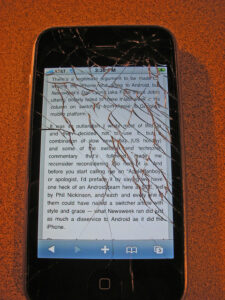
Dropping, stepping on, or even running over a phone with a vehicle are the most common causes of broken screens and cracked outer cases. Modern smartphone screens are fabricated from glass designed to withstand a certain level of abuse, but only to a certain extent. A strong impact will still break the touch screen in many instances.

3. Battery Malfunction.

Phone batteries that do not charge properly are additional reasons for repair. Some batteries may hold a charge but die out quickly, which also indicates functionality problems. The root cause is often a manufacturing defect in the battery, and a replacement one will solve this issue.

4. Nonworking Buttons.

The home button occasionally gets stuck from frequent use, and this can make regular phone use an annoyance. Other related problems include a broken side switch for turning off the ringtone or non-working volume control.

5. Connectivity Problems.

Inability to pick up any wireless Internet is an additional cause for repair. This problem often stems from firmware errors or similar issues with the operating system. Related phone problems include apps that do not download or install correctly.

Is Radiation Exposure Linked to Cell Phone Use?

radiation-cell-phoneOne of the concerns of cell phone users is whether they are exposed to unhealthy amounts of radiation when using cell phones.

A number of countries have started looking at the dangers linked with cellphone radiation and have started setting standards for the usage of the phones. Some countries ban the use of these phones in public places like trains.

Some medical experts believe that radiation from cell phones is more dangerous than cigarette smoke, because of the wider use of these appliances; however, there is not scientific consensus about how much danger a cell phone can actually cause.  The amount of cell phone use could be a factor, as well as using a physically-damaged cell phone that needs repair.

The Dangers Involved

The operation of cell phones involves using electromagnetic radiation from the microwave region in this spectrum. This radiation is absorbed by the human body and thus users of cell phones are constantly exposed to such radiation. The amount of radiation that is emitted by a cellphone will depend on its model. Such radiation is measured as a Specific Absorption Rate, and safe levels are those below 1.6. W/kg of body weight.

Such radiation is also emitted by cellular towers that dot most city landscapes and are also found all over the country. It is said that such radiation has the possibility of being carcinogenic.

Factors Affecting Risk

  • Radiation from cellphones can vary depending on where the antenna is placed. Handsets that have these antennas very close to the ear piece are more damaging. It is best to use air tube headsets in order to reduce the radiation.
  • Phones should be switched off when not in use.
  • It is best to limit the use of cellphones by children, as they are more vulnerable to such radiation.

When you are overexposed to this form of electromagnetic field radiation, you will notice tingling and burning sensations in the head, hands and face, and probably some pain. You may feel very tired, be subject to fits of absentmindedness and find it difficult to sleep. While yet not really proved, scientists feel such radiation can cause cancers, tumors and tissue damage.

Protection

There are a number of ways that can help to protect a person from radiation caused by cellphones or cellular towers.

It is possible to protect a home completely from outside electromagnetic radiation with the use of specific ‘net’-like devices. There are also accessories that can change the position of the antenna so that radiation is kept away from the head. It is not possible to block all radiation that emanates from a cellphone, as this will prevent it from working.

There are certain proprietary products available that will prevent the radiation getting through to sensitive parts of the body. These protection devices are attached to the ear piece and prevent most of the radiation, over 90 percent, from entering the head. The percentage of blocking can also depend on the model of the phone. There are also radiation free headsets available that can block all radiation.

Make iPhone Ringtones for Free in iTunes

free-iphone-ringtones-ifixyour

So you just bought an iPhone, and you want to buy a custom ringtone. Then you discover the songs are a buck each, and then another buck to make them into a ringtone on iTunes. If you want them for free, I’ll show you how to do it all within iTunes, no external program required.

Set Up for Free iPhone Ringtone

What to do first is to go into iTunes and pick a song. You can only pick a song that was not bought in the iTunes store. So either a song ripped from a CD, or that you find elsewhere on the internet.

Take the song, right-click on it and select “Get info”. Go down to the options menu and pick the start time and the stop time. Say the part of the song that you want to use for a ringtone is in the middle of it.  Indicate the start time for when the section of the song begins, and end it wherever you want. It doesn’t matter where it is in the song, as long as it lasts less than 40 seconds. Notice there are no dots in between minutes and seconds.

Now you’ve set when the song starts, and when it stops. If you were to play the song now that you’ve created a start and stop time, it will only last as long as the segment you indicated, even though the length of the song will still be the same. What you can do is right-click again, and choose “create AAC version”.  Create an AAC version and iTunes will create a copy of the song with the times that you have selected.

Fix Your Files

Next, go back to the song you’ve altered and undo the time changes you made in the options. That way, when you go back to listen to it later, it doesn’t just play the short clip you arranged.  Then take the short version for your ringtone to your desktop, and return to iTunes. Delete the short version from iTunes, so the copy isn’t taking up space in iTunes anymore.

Make the iPhone Ringtone

Next, go to the short track on your desktop, click on it, and change the name. Notice the format of the song is MPEG4 (‘M4A’ file extension). You’re just going to delete the A, to create an R, so the file’s extension would be .M4R instead of .M4A. If an alert comes up, confirm that you’re changing the extension.

Double-click on the song, and when it starts playing, it’s added in your ringtones automatically. Finally, on your iPhone, go to the ringtones section and sync it. Now your ringtone will be on it.

Adding personalized ringtones can make an old phone feel like new.  Before you purchase a new phone for fancy build-in ringtones, consider trying this simple method.  If your current phone isn’t performing properly, getting it fixed will also make it new.  Don’t take chances: leave iPhone repairs to the experts at iFixYouri.

Why iPhone Water Damage is Common

iphone-water-damageWe carry our iPhones wherever we go: to the office, the parks, the beach, and so on. They can get exposed to the elements if we are not careful and it only takes a few moments of inattention for undesirable things to occur. Sometimes mobile devices can be immersed in water even inside the house.

The Most Frequent Causes of iPhone Water Damage


Pool

When people swim in a pool, their phones are often placed near the edge of the pool for quick access. This habit makes phones vulnerable to being accidentally dropped in the water.

Rain

Sudden showers can leave us drenched and if we are carrying a phone, there is a good chance it will not be dry either. Even when we place it inside a bag or a protective casing, water has an uncanny ability to seep through, anyway.

Washer

We often forget to take stuff like keys, cash, and yes, phones out of our pockets. When our clothes hit the washer, an odd noise will let us know that something is not quite right.

Bathroom

We grow so attached to our phones that they often accompany us to the bathroom, just in case we get an important message or call. It could get splashed with water or succumb to moisture without us knowing until it is too late.  Dropping a phone in a toilet or urinal is quite common, especially since many people use their phone while using the facilities.

Babies

It’s not recommended to lend your expensive electronic devices to a baby as a toy, as it’s not safe for the baby as much as they’re not safe for the phone.  Using the phone as a chew toy will certainly transfer some liquid into the device, but that may be the least of your problems when it comes to the damage a baby can cause.

Wait – Before You Buy a New Phone…

After an iPhone has suffered the fate of coming in contact with water, all is not necessarily lost.  Fortunately, there are steps that can be taken to save some of the data, and perhaps the phone itself.  Learn more about the initial steps to take here, or contact iFixYouri for experienced professional iPhone water damage repair.

A Short But Complete Guide to Android 4.0

In anticipation of the debut of the Android 4.2 update, let’s examine what has made the Android 4.0 such a big deal.  Also known as Ice Cream Sandwich (ICS), the Android 4.0 operating system from Google comes with a host of new features and improvements that makes it a big landmark for Android-based phones.


The New Android Home Screen

The new home screen comes with a custom font called Roboto. Along with this font, you will find the following in the new home screen:

  • The status/notification bar is found at the top of the screen. Its left side shows notifications whereas on the right it displays the battery and time. The notifications can be accessed by swiping the notification icon downwards. You can customize the types of notifications you are shown there.
  • The Google Search Bar is found at the top of the home screen.
  • The Favorites Tray can be used as a docking station for folders and apps.
  • There are three navigation buttons at the bottom — back button, home button and recent apps button. The old menu button has been discarded.

Apps in Android 4.0

Installing apps on ICS works the same way as it did in the previous version — you can install them from any source by touching and pressing the download button to install it on your phone.

To access the apps installed on your phone, you should press the Apps button on the bottom right of your home screen to get into the All Apps area. To uninstall an app, drag and drop its icon onto the Uninstall icon. If you like an app, you can send its shortcut to your home screen or your Favorites tray that we have already mentioned. Widgets in ICS can be accessed by touching the Widgets tab on the app drawer; overall they work similar to how they did in the previous version of the OS.

Other Highlights of Android 4.0

Settings

You can reach your settings by touching the notification panel and touching on the settings icon. Some new settings are: Data Usage, Battery and Apps sections. Other settings includes Accounts and Sync that show you the different accounts, such as email and other service accounts, connected to your phone.

Search and Voice Control

You can now Google search using your voice. It’s like Siri, but not quite…

File Management

Even though the new Android OS allows you to browse your phone’s memory like it’s a computer, you can improve your downloaded file management by installing a file management app.

If you’re not keen on upgrading to a new operating system until the bugs are worked out, then you’ll likely want to continue using your current phone.  If you are experiencing any issues like a cracked screen or malfunctioning parts, let us repair your Android phone at iFixYouri — and save yourself the hassle of transferring all your data and setting preferences on a new phone.

Issues with Retina Displays on MacBook Pro

If an extensive discussion thread in forums on Apple Support is any indication, then there is seemingly a problem with a number of MacBook Pros that are outfitted with Retina displays. The affected Retina displays show burn-in and image retention.

LG Manufactured Displays

John K, who is a member on the Apple Support forums, contributes to the discussion by pointing out that the problem seems to be taking place primarily with MacBook Pros that are outfitted with LG manufactured Retina displays. It has been found that other displays that are manufactured by Samsung seemingly display the colors more accurately, they are brighter and they do not have the same issues with burn-in and image retention.

Terminal Command

This helpful terminal command:

ioreg -lw0 | grep \”EDID\” | sed “/[^<]*xxd -p -r | strings -6

will assist you in determining the manufacturer of the display that has been installed in your own MacBook Pro.

This terminal command is used to check whether an LG Screen is on a MacBook Air. If the display code starts with “LP,” then it is an LG display. It has been verified that users of the LG panel see a faint ghosting of the Finder windows whenever they access any PowerPoint slideshow that has a gray background.

Individuals who have a MacBook Pro outfitted with a Retina display and have been experiencing this problem can contact iFixYouri to perform the necessary repairs.

Has the iPhone 5 Changed Our Lives?

Regarded by many smartphone enthusiasts as being the most anticipated handheld device in the past 2 years, the iPhone 5 has certainly not disappointed (neither in performance nor projected sales). But, apart from the new sleeker design, increased screen length, LTE, lighter frame… What does the public actually think of the newest addition to the Apple family? Well one thing is certain, it is true what they say about opinions and like elbows we all have them.


Although the iPhone 5’s glowing reviews are warranted, I feel this reviewer makes an excellent point of the consumer being required to pay $29.99 for an adapter to integrate this phone with older Apple devices. It would have been nice to see that included with the iPhone 5, considering that the added adapter would’ve cost Apple pennies on a phone that retails for $699.


Now besides the adapter issue (which let’s face it, isn’t really a huge factor), Apple’s introduction of Apple Maps and the move away from Google Maps threw many users for a loop (some perhaps literally if they were trying to follow Apple’s map). As this reviewer had explained – Apple has acknowledged its error, which in and of itself is always a good thing, and is going to fix the challenge. Apple Maps features a 3D overview of a city’s geography; however, it doesn’t actually give the user the capability of getting directions to their destinations. Which (although cool), for obvious reasons is a bit of a problem considering that this is the sole purpose of any map.


I think it’s safe to say that the overall consensus regarding the iPhone 5 is that all that have purchased theirs are pleased with its performance. Considering that for a device with such a broad and fanatic following, it is pretty amazing that its negative reviews are so sparse and seldom found. Short of any unforeseen issues such as the dropping, drowning or other physical damage that one may do to their iPhone 5, it is pretty safe to say that Apple has not lost any fans with its latest installment.


Smartphone, Tablet and Computer Repairs and News