Category Archives: iPhone Repair

All posts related to iPhone Repair, including repair tips, specific iPhone generation repair details, iPhone parts, and repair news.

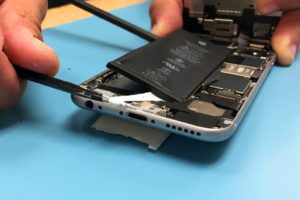
iPhone 6 Battery Replacement: How To Guide

Introduction

iPhone 6 Battery replacement is relatively easy. The clasps holding the screen onto the body near the top are at an
angle. The flex cable for the screen is also towards the top but you will not need to disconnect it to replace the
battery.

There are two strips of white adhesive under the battery that are a nuisance to remove but it is much harder to try to
pry the battery out without doing so. Let’s do this.

Exercise caution when working with batteries, especially swollen
ones
.

Tools Needed

  • Metal Spudger [BUY]
  • Pentalobe Screwdriver #000 [BUY]
  • Spudger [BUY]
  • Tweezers [BUY]
  • Tape [BUY]

Recommended: Magnetic mat [BUY],
screw capsules [BUY]

Parts Needed

iPhone 6 Replacement Battery [BUY]

General Repair Guidelines:

  • Always use good lighting – smart device components are small and you’ll need plenty of light to see what you
    are doing.
  • Maintain a clean, organized workspace so you don’t lose or confuse any components.
  • After separation, keep the back housing and screen in close proximity until all flex cables or other wire
    cables are disconnected.

iPhone 6 Battery Removal Steps

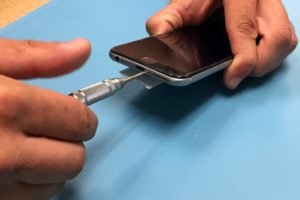
  1. Unscrew the two pentalobe screws on either side of the lightning dock on the bottom edge of the iPhone 6.
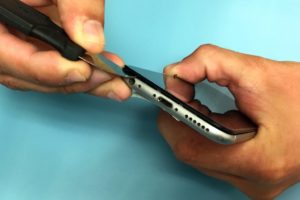
2. Use the metal spudger to slowly and carefully separate the glass screen of the iPhone from the body. Start on
the bottom edge of the device and proceed slowly. The flex cable for the screen is at the top.
3. Slowly pull the top of the screen away from the body and locate the EMI (electro magnetic interference) shield
located by the bottom right of the battery.
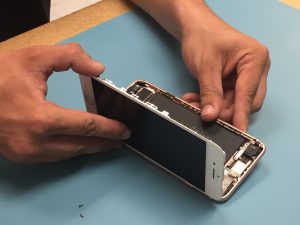
  1. Unscrew the two screws securing the EMI shield to the logic board and remove it.
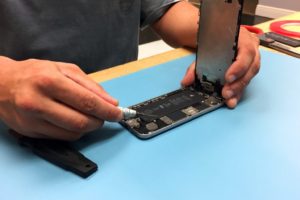
  1. Using a spudger, disconnect the battery cable from the logic board.
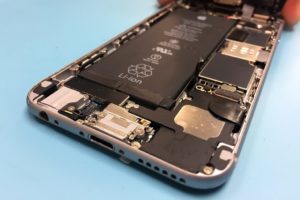
  1. The next steps involve removing the adhesive tape underneath the battery to make it easier to remove. Slide one
    tip of your tweezers under the black adhesive strip at the bottom of the battery. Each black strip runs halfway
    across the bottom of the battery.
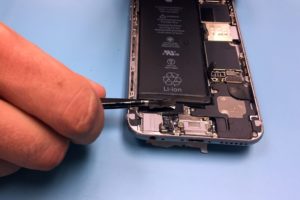
  2. Now roll your tweezers away from the battery while simultaneously pulling the tape out from underneath the
    battery.
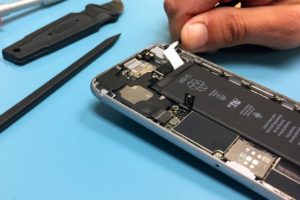
  3. Continue to pull the tape out from underneath the battery and roll it around the tweezers. It may help to pull
    diagonally out from the corner as the tape runs up the full height of the battery.
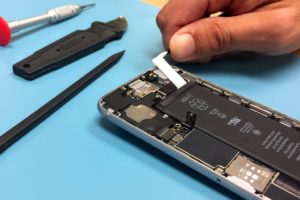
  4. If the white tape snaps apart you may need to use a spudger to carefully pry the battery up. Continue using a
    combination of tweezers and the spudger to separate the battery from the body of the iPhone. You will have to
    repeat the process to remove the second strip of tape.
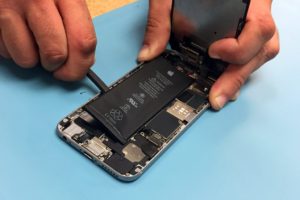
  5. Now you can remove the battery. Use a small length of some adhesive tape to secure the new battery in place.
    Reconnect the battery cable to the motherboard and screw the EMI shield back on.
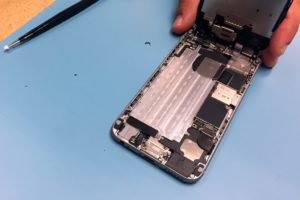
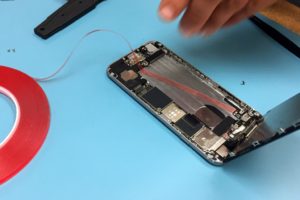
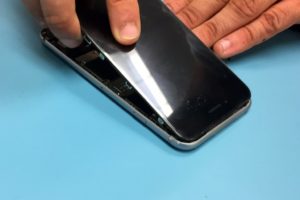
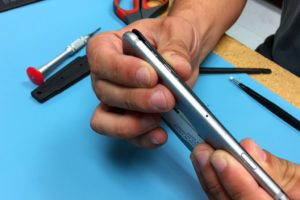
  1. Reattach the screen by angling the top in first and then clicking the side clasps into place. Replace the two
    screws by the lightning dock. That’s it! You’re done.
For iPhone 6 Battery Help, Repairs, or Parts

If you need parts or tools for this repair, or if this repair is too much to attempt on your own and you need
professional help with your iPhone 6 repair,
contact iFixYouri at 888-494-4349or www.ifixyouri.com.

What to Do if You Drop Your iPhone 7 in Water?

Water damage is not a death sentence to an iPhone. Chances are we’ve all experienced it. We drop our precious phone in some sort of liquid. We jump in the pool with our phones in our pockets. We drop it in the toilet. We spill a beer on it. Inevitably something happens.

Being that water damage repair is one of our specialties, we are asked this question a lot, dozens upon dozens of times per day. While the new iPhone 7 is not completely waterproof, it is fairly water resistant. With the help of some adhesive sealing the screen, some rubber gaskets around certain components, and some tweaks in the design, the chances of needing an iphone 7 water damage repair are lower than previous versions. This does not mean that you should try to push the phone to its breaking point and it certainly does not mean it’s immune to water damage. Something as simple as having your phone in the bathroom while you take a hot shower can cause problems.

First Steps After Dropping an iPhone 7 in Water

The process is quite straight forward and taking quick action can help decrease your chances of failure, and increase your chances of having a good, working device. This will work on other devices as well, but since we’re talking iPhone 7’s here, we’ll use this as our main example.

STEP 1) Turn Off the Device

First and foremost, turn off the device, and if it’s a model phone where you can easily remove the battery, do so. It is highly likely that your phone will work after you pull it from the water. The number one killer of water damaged phones isn’t actually the water, it’s the current that travels through the logic board after it gets wet. When you cross electricity with water, a short will occur.

iPhone 7 Power Button

STEP 2) Open All Covers and Ports

For an iPhone 7, pop out the SIM card tray by inserting the end of a paper clip in the small hole on the right side of your phone, take off any case, do not plug it in. You want to make sure if water has gotten in, that there is a way for the water to get out. You don’t want the liquid to be trapped inside if at all possible.

iPhone 7 SIM Card Removal

STEP 3) Dry Out Your Phone

We don’t advise to shake the phone, as this can cause water to get deeper into the board. Instead, we recommend using some sort of desiccant. You want something that will draw the water out. A shop vac is an okay application. Silica gel is ideal. A dehumidifier works wonders. A container of Damprid from Home Depot can also do the trick and will only run you about $10.

Steer clear of using anything that generates an excessive amount of heat, as this can only further damage the device. Do not place your phone in an oven or toaster. This is all around a bad idea.

A combo of Damprid, somewhere with good air circulation, and opening your device as much as possible will be your best chance of survival.

What do you do after your iPhone has been soaked?

After you complete the simple steps above, you need to wait. Do not try to power your phone on in any time less than 36 hours. It’s super important that your phone is completely dry before any attempt is made. If after 36 hours you see any liquid, do not try to power it on, you’ll just have to wait a bit longer. Let that Damprid soak up any liquid.

When you are confident any liquid that the device may have come in contact with is dry, then and only then try to power it up. If you get no power initially, it may need a good charge. Try giving it a short charge. If you don’t notice anything light up on the screen, chances are your battery may be shot, and possibly other components.

At this point, you may need to bring your phone to a repair shop or use a mail-in service for deeper diagnostics and help. iFixYouri has a no-fix, no-fee policy. We offer free round trip shipping on all services, including all of our iPhone 7 Repair Services.

Regardless of the state of the device, we recommend a good cleaning by a professional repair service after your device has been wet. Water can leave residual minerals and build-up on the components, which should be removed to ensure longevity and good functionality.

What should you do with a device that can’t be repaired?

In the event that iFixYouri cannot fix your device, there are options. The device can be sent back to you. It can be recycled (if it carries no value), or if it’s a relatively newer model (iPhone 5 or higher), you can sell your iphone and use the money you earned to purchase a new device.

We know how frustrating water damage can be. We see it every day. By taking the correct steps immediately after it happens, you can dramatically increase your odds of having a good, working phone again.

If you have any questions or need professional help for iPhone 7 Repairs, feel free to reach out to us at iFixYouri.com, or call us at 888-494-4349.

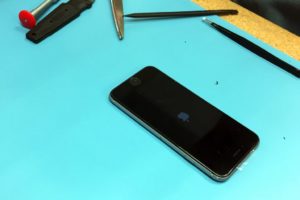
iPhone Boot-Up Time Comparison: 6S vs. 6 vs. 5S vs. 5 vs. 4 vs. 3GS

The iPhone 6S is here, so we decided to do a boot-up time comparison across several generations of iPhones (6S, 6, 5S, 5, 4 and 3GS). The method was as follows:

  • Power off all phones.
  • Simultaneously start a digital timer at the same time (manually) as pressing the power up button.
  • Compare the boot up times

Obviously when the human element is involved in timing, there is a small degree of error. Despite that, and since the results are not that close, the results are pretty interesting and surprising.

  1. iPhone 6S – 20.99s
  2. iPhone 6 – 22.31s
  3. iPhone 4 – 26.83s
  4. iPhone 5S – 30.11s
  5. iPhone 3GS – 30.73s
  6. iPhone 5 – 34.16s

Not surprisingly, the iPhone 6S, with its high powered custom-designed 64-bit A9 chip, took first place. This chip claims a performance level once found only in desktop computers, up to 70 percent faster CPU performance, and up to 90 percent faster GPU performance, according to the Apple website. The iPhone 4 had a good showing, coming in third. Also of note is the last place finish of the iPhone 5.

Do you notice your iPhone 6S being faster (or slower) than previous generation iPhones? We’ve heard from many people that they felt like iOS 8 was a bit faster than iOS 9. Now that iOS 10 is out, as well as the iPhone 7, maybe people will have more to say about their iPhone speed. Let us know in the comments. If your phone is slow and beyond saving, iFixYouri offers cash for used phones through our buy-back program. We also offer a full range of iPhone Repair Services.

iPhone 6s Bootup Time Comparison

Credit Card Processing, There’s An App For That

The introduction of the Smartphone has greatly increased the quality of access to many of our lives and no where has this point rang truer than in the world of small business. With the introduction of the various card processing systems for Smartphones such as Square and ROAMpay. The average small business owner now has the opportunity to accept credit card transaction and potentially widely increase their sales growth.

What Does This Mean for the Average Entrepreneur?

Obtaining a merchant account has not always been a easy task and for those just starting out in the open market the ability to offer alternative forms of payment, beside just cash transactions, can make all the difference. Whether the business be retail, culinary, artistic or other. Having an attachment for one’ s Smartphone (or in some cases iPad) for credit card processing alleviates the hassle of bulky point of sale terminals and worst yet, the old fashion “knuckle buster” manual imprinters. All in all presenting their customers with a smooth and convenient shopping experience which often results in repeat business.

Caring For Your Business By Caring For Your Smartphone

Having a Smartphone as a small business owner is a “no brainer” whether it be for credit card processing or simple day-to-day activities. Therefore, the protection and maintenance of such a vital tool is paramount. At iFixYouri, you can rest assured that if your Smartphone happened to be involved in an accident, be it water damage, a cracked screen or simple battery replacement issues, you are certainly in good hands. Because, when it comes to nurturing your business there’s no sense in faulty equipment stunting its growth.

Today is Earth Day. Let’s say NO to recycling! Well, sort of.

We’ve decided to become a bit “anti-recycling” here at iFixYouri. Now not with all things. We’re still firm believers in recycling soda cans and water bottles, but lets bring things to a reality point here; with certain things REPAIRING is really better for the environment than recycling! Use, repair, re-use.

iPads are a great example of why you should still repair, versus discard, and buy a new one. The iPad 1 to the iPad 2 had quite a few changes. Apple added a camera, a sleeker back housing, a faster processor, and a small myriad of other features that we all need so so badly and we’d have a hard time living without.

I recently broke my iPad 2 and was left scratching my head and trying to decide what I should do. Should I go out and buy the latest and greatest iPad 4? Or should I stick with the old and trusty iPad 2? I stopped into my local store just to give it a test run. It felt the same and looked identical. The only real difference I could see was the processor was a little quicker. This to me just isn’t enough to justify spending $500 on a new device vs $159.99 on an ipad repair that virtually looked the same and still ran all the same apps. The differences between models of all these crazy devices that have been coming out recently are so minor it’s so hard to tell the difference. To me, the retina ipad looks just like my ipad 2.

We live in a consumers market and in a consumers market, we’re often driven to replace and recycle. We’re trying to change that mentality. We’re trying to get people to realize that repairing is really the way to go! Recycle your newspaper and cardboard boxes. Recycle your water bottles and beer cans! Reuse and repair your devices!

Every year millions of devices get thrown into our landfill. We’re more concerned about this than most people are, as we are a repair business, and we’re trying to play our roll in order to minimize the impact that these devices have on our planet when their lifespan has come to an end.

We work with a tight group of recycling companies that can handle responsibly disposing of devices, should a device finally get to the point of non-repair.

We’d like to help. And we’d like you to help. Put some thought into it and some care. If you have any questions about repair or recycling, give us a call at 888-494-4349 or email us at [email protected].

LocalScope And Other iOS Apps For Your Local Search

Since the dawn of the smartphone, our world has become smaller and considerably more accessible. Through the aid of local search apps, getting a bearing on one’s location and what of interest may surround them is as easy as a simple click. It almost makes you wonder, how did we survive prior to such a convenience?

While browsing through a list of iOS apps, I came across a local search tool called LocalScope. Though a lot of people already use Google Maps (which is now available for iOS) for their local search, and the Apple Map (powered by Yelp), after reviewing LocalScope (review available below) however, I decided to also search for some other apps that may help you in finding what you want, near your location.

Apps For Your Local Search

Unfortunately, the Android version of these apps is currently unavailable.

AirYell

A free app that provides you with a listing and green car icons you can use to get turn-by-turn directions.

AirYell is like a personal Yellow Pages, where you can add a search term or speak it out, to get a list of results for your area. You may also get some listings too by touching some of the icons at the bottom of the app interface. AirYell provides some information about its listings and maps to view their locations, and it also provides turn-by-turn navigation features with voice.

Where To?

An app with an appealing interface and lots of categories (cost – $2.99).

From the Where To? interface, you may choose a common search item which will then be displayed in a list, on a map or through augmented reality (this will cost you an additional 99 cents). Where To? has a massive list of alphabetized services you can quickly get to. The augmented reality feature in the app allows you to see all the places that are in some specific directions within your area, though the extra you may have to pay to use the feature may be a turn-off.

LocalScope

An app that uses social data from popular social networks, along with GPS, to provide you with some information and details about what is near your location.  You may search through a lot of social networks and other reference sites with it (cost $1.99).

With LocalScope, you will get some listings, photos, tweets, history, and a lot more through the Search or Discover buttons in its app interface. It is a great choice for finding what you want and discovering other new places too.

To enjoy these apps properly, you’ll need a GPS that is working. Unfortunately, it is one of the features that seems to fail for many iPhone users. If you are experiencing this problem or any other technical issue, you can send your phone to professional repair specialists at iFixYouri.

Is it Possible to Fix Water Damaged iPhones Completely Submerged in Water?

iPhone Water DamageIs it possible to fix water damaged iPhones? Contrary to what many people believe, repair can succeed, even if the device has been totally submerged in water. If you take the correct steps immediately, there is a high chance that your iPhone can be brought back to life again.

What To Do to Fix Your Water Damaged iPhone

  • Make sure that the device is off and do not switch it on again
  • Open the case and take out the SIM card
  • Without going to extremes, shake out any excess water and dry it with a clean, dry cloth
  • If you do not have silica, put some rice into a bag, and place the device into the rice immediately after you have dried it off
  • Search online for companies that do repairs on water-damaged iPhones, and contact them as soon as possible.

Don’t imagine that by putting your iPhone in a bag of rice, it will get perfectly dry and work as normal again, because it probably won’t.

Effects of Water Inside an iPhone

Even if there is just one drop of water left inside your iPhone, corrosion can set in very quickly. Eventually this can damage your device beyond repair. The repair company that you send your iPhone to should have the expertise to remove any liquid or oil damage from your device. It is possible to get it working as good as new again.

If this proper process is not carried out on your iPhone, it will probably work for a while. However the features will start dying out one at a time as corrosion takes over.

How to Fix Water Damaged iPhones

Make sure that you find a company that specializes in repairing water damaged iPhones, rather than taking it to the manufacturers, who will only replace your iPhone with a reconditioned one, at a price of about $200, and all the data from your old device will be gone for good.

Companies specializing in fixing iPhones damaged by water will give your device a thorough diagnostic. Then they can fix any problems that might be preventing your iPhone from operating normally. The best thing about such companies is that you can send your phone via mail to the company. Then after they fix it, they will send it back to you, making it a hassle-free process. The next time you accidentally drop your iPhone in water, just send it to us and we will fix it for you.

Smartphone Glass Repair: What Options Are Available?

Smartphones are wonderful gadgets, but as the latest, sleekest designs tend to be made of glossy and glassy materials, they can easily get damaged. All too often, someone’s favorite device gets dropped and becomes scratched, or worse. When this happens, users are often unsure of what to do. Do you need to replace the whole device or are you able to get your smartphone’s glass repaired?

Smartphone Glass Repair vs. Replacing

The world we live in encourages us to replace any device that goes wrong. It is becoming more and more popular to throw away broken or even scratched iPhones in order to replace them with new ones. The problem is that this can be a very expensive process. Having to buy a new smartphone when you drop your current one is an expensive habit that can cost you hundreds of dollars each time.

Benefits of Smartphone Glass Repairs

  1. Smartphone glass repair is a viable alternative to replacing your device.
  2. Repairing your iPhone instead of replacing it can save you a lot of money.
  3. The repair turnaround time can be very fast.
  4. Sending your device away to get repaired is easy and can be done via the internet.

Doing It Yourself

It is certainly possible to save yet more money by doing the repair yourself. However, there are a few potential problems with this. The main issue is that many modern devices are assembled so that user servicing is nearly impossible. Apple’s iPhone displays are connected to the glass as a single unit, so you cannot just replace one or the other. However, if you are technically-minded and have experience repairing similar devices yourself, then it is definitely an option. You can get dedicated repair kits for specific applications and save some money compared to sending your phone away.

Key Points

  • Do-it-yourself repairs require technical knowledge and great care.
  • You can save more money by using the DIY option.
  • Irreparable damage to the phone may result from a bad DIY repair attempt.
  • Sending your phone away to be repaired guarantees an expert service.
  • For most people, an expert repair job is the best solution by far.

Professional iPhone Repair Services

Smartphones are extremely sophisticated electronic devices. As a result, it is not surprising that the technology is very delicate. If your smartphone has unsightly scratches on the screen, poor touch sensitivity, odd colors or anything else, then it may need a smartphone glass repair service. The best thing about shipping your phone to be repaired by iFixYouri experts is that you can rest assured that your phone is being handled by professionals with years of experience.